Hiding & Moderating Reviews
While we always encourage transparency, there are times when a specific review—perhaps one containing sensitive information, spam, or a temporary misunderstanding—isn’t something you want to showcase on your website or social media.
Our platform allows you to Hide these reviews. This keeps your data intact but removes the content from all public-facing elements like widgets and social images.
🚫 Why “Hide” Instead of “Delete”?
We strongly recommend Hiding reviews rather than attempting to delete them from our platform.
- The Re-Sync Factor: If you delete a review in our dashboard, there is a high probability it will reappear the next time the system re-syncs with the original source (like Google or Facebook).
- Data Integrity: Hiding a review keeps it in your internal “Reviews” table for your records, allowing you to track all feedback while choosing exactly what the public sees.
🛠 How to Hide a Review
Follow these steps to moderate your public feedback:
- Go to Reviews: Click on Reviews in the left side menu.
- Locate the Review: Find the specific review(s) you wish to moderate.
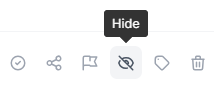
- Click Hide: Simply click the Hide button located directly under the review text.
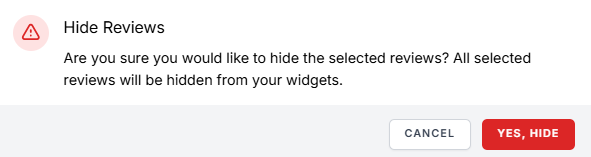
- Confirm: A confirmation box will appear; click to confirm you want to hide the review.
What happens next? The review will remain in your dashboard’s table but will be marked with a “Hidden” status. It will immediately stop appearing in:
- Website Widgets: Any review carousels or feeds on your site.
- Social Images: Any automated “Review of the Week” images or social posts.
🔄 How to Unhide a Review
If a customer changes their mind or a situation is resolved, you can bring the review back into the spotlight at any time.
- Navigate to Reviews: Go back to your Reviews table in the sidebar.
- Filter/Find: Locate the review marked as “Hidden.”
- Click Unhide: Select the Unhide button (this replaces the Hide button on moderated reviews).
- Confirm: Once confirmed, the review will automatically re-populate in your widgets and social media image pools.
✅ Best Practices for Review Moderation
- Embrace the Mix: 95% of consumers suspect censorship or faked reviews if they don’t see any negative feedback. Only hide reviews that are truly inappropriate, fake, or harmful to privacy.
- Respond First: Before hiding a negative review, try responding to it professionally. Often, a public resolution is more impressive to potential customers than a perfectly curated list of 5-star reviews.
- Check for Spam: If a review is clearly fake or violates the source platform’s terms, hide it here and report it on the original site (Google/Facebook) to have it removed permanently.
Was this article helpful?
Thanks for your feedback!