How To Protect Against Negative Feedback
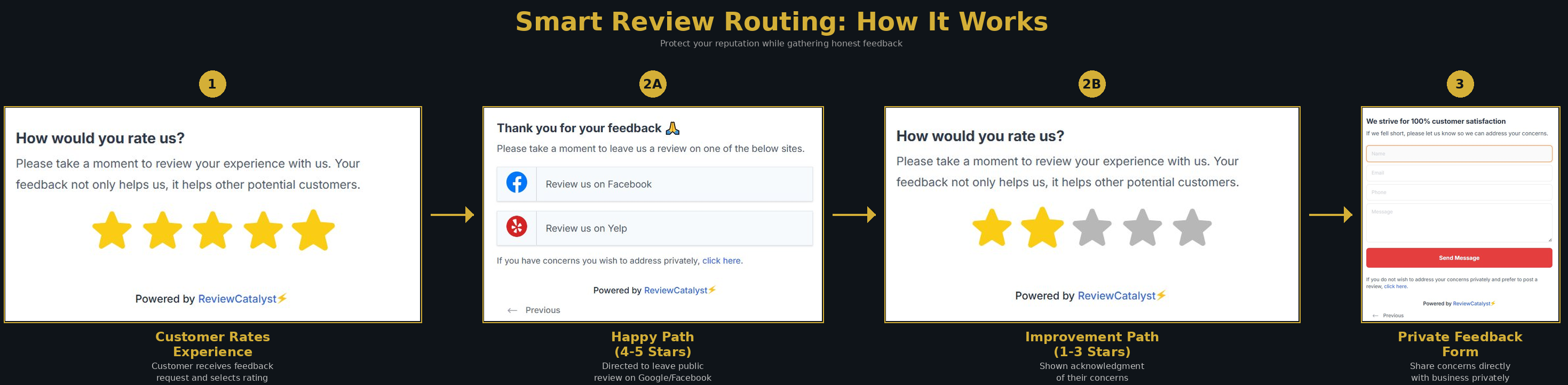 Negative reviews are sometimes unavoidable, but they are often the result of a simple misunderstanding. Providing a direct channel for communication can resolve these issues before they escalate into public feedback. ReviewCatalyst uses an intelligent feedback funnel to detect unhappy customers and guide them toward a private resolution.
How the Feedback Funnel Works
The system automatically categorizes customers based on their initial rating:
- Happy Customers (4–5 Stars): These users are identified as satisfied and are automatically prompted to leave a public review on your connected platforms.
- Unhappy Customers (1–3 Stars): The system triggers a private feedback form, allowing the customer to vent their frustrations directly to you rather than posting publicly.
Setting Up Your Feedback Form
- Navigate to Forms: Click on Get More Reviews in the left sidebar, then select Feedback Forms.
- Create New Form: Click the Create Form button, provide a name for your campaign, and click Next.
- Customize the Setup:
- Funnel Type: Choose how you want to collect the initial rating, such as Stars , Rating , Emojis , Thumbs , or directly via Review sites.
- Branding: Use the toggles to show or hide your Company Logo and Company Name.
- Configure “Stop Negative Feedback” Logic:
- Navigate to the Setup tab within the builder.
- Enable Protection: Ensure the Stop Negative Feedback toggle is set to On.
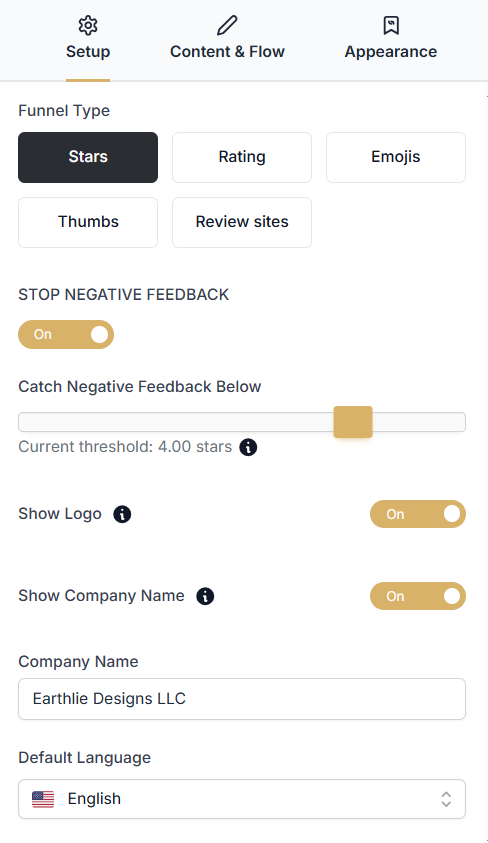
- Adjust Threshold: Use the Catch Negative Feedback Below slider to define what constitutes an “unhappy” customer. For example, setting the threshold to 4.00 stars means any rating below 4 stars will trigger the private form.
- Finalize: Click Save once you are satisfied with the live preview.
- Distribute: Click the Share your form button to access installation code, hosted URLs, or QR codes.
Handling Private Feedback
When a customer submits a private form, the details are sent directly to your email and stored within the ReviewCatalyst platform. This allows you to respond immediately, resolve the complaint, and potentially turn a negative experience into a positive one.
Frequently Asked Questions
Is this against review site guidelines? No. We do not block a customer’s ability to leave a public review; we simply prioritize a private resolution channel first. If a customer still wishes to post publicly, they can do so via a link at the bottom of the private form.
Why is this beneficial? It increases your overall review volume by making it easy for happy customers to find your review pages, while simultaneously protecting your public rating from avoidable one-star reviews caused by minor service hiccups.
Was this article helpful?
Thanks for your feedback!